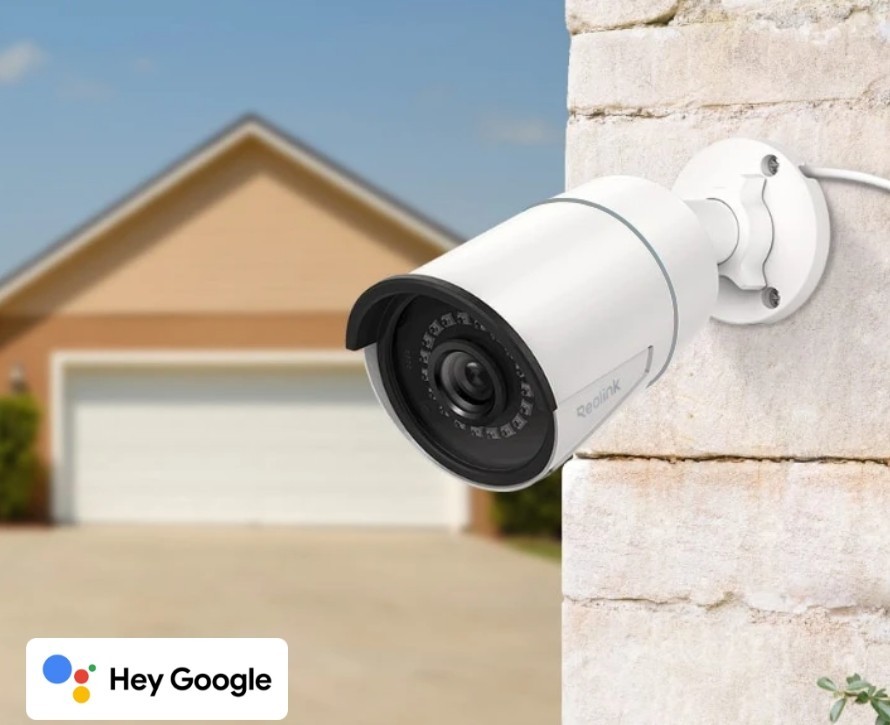

Photos from current listings. Actual item, color, and included accessories may vary.
Reolink PoE Camera Buying Guide
Reolink PoE cameras are wired IP security cameras that draw power and data over a single Ethernet cable, eliminating batteries and Wi-Fi dropouts. The core trade-off is sensor resolution versus low-light performance and lens field of view: higher megapixels on a small sensor produce noisier night images. Buy a PoE camera only if you can route Cat5e/Cat6 cable to each location and own an NVR or PoE switch; otherwise choose a Wi-Fi or battery model.
At a glance
- Category
- Home Security
- Status
- Listings available
- Last updated
- Nov 22, 2026
Current offers
Highlights
- PoE standard: 802.3af (15.4W) powers most Reolink models; 802.3at (30W) is required for pan-tilt-zoom units with motors and IR arrays.
- Resolution tiers: 5MP (2560x1920) on 1/2.7" sensor versus 4K 8MP (3840x2160) on 1/2.8" sensor; 5MP delivers cleaner night video with less noise per pixel.
- Lens options: 2.8mm (~90° horizontal) for wide coverage, 4mm (~80°) for balanced views, 8mm/12mm for long-range identification at gates and driveways.
- Weatherproofing: IP66 or IP67 rated housing with operational range of -10°C to 55°C; cable glands and RJ45 connectors must be dielectric-greased and sealed against moisture ingress.
Best use cases
- Best fit: residential exterior perimeter with accessible eaves or soffits—run Cat6 from a PoE NVR (8-channel or 16-channel) and mount 5MP 2.8mm cameras at 2.5–3m height for full-yard coverage.
- Best fit: driveway and gate identification—use a 4K 8MP model with 4mm lens or a varifocal 2.7–13.5mm lens, paired with a 30W 802.3at injector for PTZ models.
- Wrong fit: renters or finished interiors with no cable paths—PoE requires drilling and cable runs; choose a Wi-Fi or battery camera instead of forcing a PoE install.
- Skip: buying a PoE camera without an NVR or PoE switch—the camera will not power on from a standard router LAN port; budget for an 802.3af/at switch or NVR.
Buying tips
- Count cable runs first: each camera needs one home-run Cat5e/Cat6 cable to the NVR or switch; runs over 80m require a mid-span PoE extender or fiber.
- Match sensor to night duty: 5MP on 1/2.7" sensor outperforms 8MP on 1/2.8" in low light; add a standalone IR illuminator if mounting above 3m.
- Verify PoE budget: an 8-port 802.3af switch provides 15.4W per port; PTZ models need 802.3at (30W) and may require a higher-wattage switch.
- Choose lens by distance: 2.8mm for wide yard coverage under 10m, 4mm for 10–15m, 8mm+ for license-plate or face identification at 20m+.
Specs
| PoE Standard | 802.3af/at (48V over Ethernet) |
|---|---|
| Resolution Range | 5MP to 16MP (2560x1920–3840x2160) |
| Form Factor | Bullet / Dome, IP66–IP67 outdoor |
| Compression | H.264 / H.265 (H.265 for 4K+) |
Alternatives to compare



Related searches
What to check before buying
- Measure cable run from NVR/switch to each camera location; PoE max distance is 100m (328ft) per run—beyond that you need a midspan extender or fiber.
- Verify your NVR or switch outputs 802.3af/at PoE; non-PoE NVRs require a separate PoE switch or 12V DC injectors at each camera.
- Check mounting surface and height: bullet cameras need a solid soffit or wall at 2.5–3m (8–10ft) for face-level capture; domes need shelter from direct sun to avoid IR glare.
- Confirm your router/network supports the camera's ONVIF or proprietary app—Reolink cameras work standalone via microSD or with a Reolink NVR; third-party NVRs require ONVIF profile S.
FAQ
Data sources: eBay / Amazon listings and product attribute feeds. Updated Nov 22, 2026.
Some links on this page are affiliate links. If you buy after clicking one, we may earn a commission at no extra cost to you. This does not change which products appear here or their order. Affiliate disclosure.