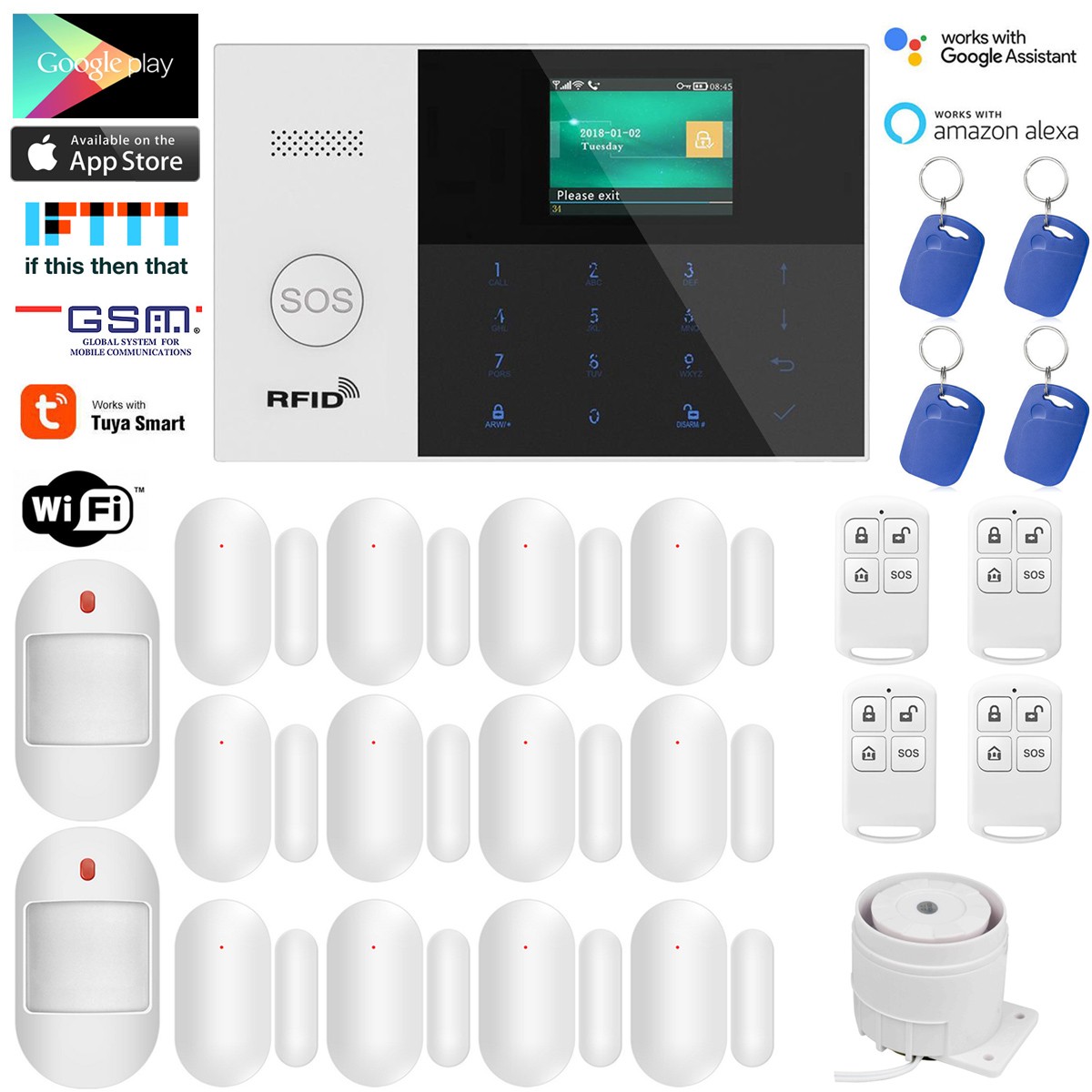

Photos from current listings. Actual item, color, and included accessories may vary.
House Alarm System Buying Guide
A house alarm system is a layered intrusion-detection package—hub, entry sensors, motion detectors, and siren—where the real decision is wired vs wireless architecture and whether the panel phones home over Wi-Fi, GSM, or both. The core trade-off is installation speed versus survivability: wireless is fast but depends on RF range and battery discipline, while wired is tamper-resistant but demands pre-wiring. Buy a dual-path (Wi-Fi + GSM) hub with 433/868 MHz sensors and local siren if you want a system that still alerts when broadband drops; skip single-path Wi-Fi kits for anything beyond a rental flat.
At a glance
- Category
- Home Security
- Last updated
- Nov 22, 2026
Current offers
Highlights
- Hub communication path defines reliability: Wi-Fi-only kits fail when the router or power drops, while dual-path Wi-Fi + GSM panels keep reporting over cellular.
- Sensor RF band matters: 433 MHz has longer range through walls but more interference; 868 MHz is cleaner in dense housing but needs more repeaters.
- Entry sensors are reed switches rated by gap tolerance—typically 10–15 mm—so door/frame alignment determines false alarms more than sensor brand.
- PIR motion detectors use dual pyroelectric elements with pet-immunity tiers (usually 10–25 kg) and 110–120° detection cones at 8–12 m range.
Best use cases
- Best fit: renters and retrofits—pick a wireless kit with peel-and-stick 433 MHz contacts and a GSM backup hub; skip wired panels that require drilling and landlord approval.
- Best fit: multi-room houses—choose a hub rated for 30+ zones with repeater/siren support and 868 MHz sensors; skip starter kits capped at 8–10 zones.
- Best fit: outbuildings and garages—use a long-range 433 MHz sensor plus external siren on a separate zone; skip Wi-Fi-only cameras as the sole detector because they miss glass-break events.
- Wrong fit: monitored-contract seekers—DIY Tuya/GSM kits push app notifications but do not include professional 24/7 monitoring; budget for a separate monitoring service or choose a contract panel.
Buying tips
- Count zones before buying: add one zone per door, window, motion area, and siren; a 3-bed house typically needs 12–20 zones, so buy a hub expandable to at least double your current count.
- Match sensor band to hub: 433 MHz and 868 MHz are not interchangeable; confirm the panel lists the same frequency and protocol (e.g., Tuya/Smart Life) as every sensor.
- Size the backup battery by outage math: a 7.4 V 1000–2000 mAh panel battery gives roughly 8–24 hours standby; choose a kit with a rechargeable backup and low-battery push alerts.
- Use a wired siren or mains-powered internal siren for audible deterrence—battery-only sirens typically output 90–110 dB but fade as cells drain.
Specs
| Hub Comms Path | Wi-Fi only vs Wi-Fi + GSM dual-path |
|---|---|
| Sensor RF Band | 433 MHz long-range vs 868 MHz low-interference |
| Zone Capacity | 8-10 starter vs 30+ expandable zones |
| Backup Runtime | 8-24 hr rechargeable panel battery |
Related searches
What to check before buying
- Measure every door and window frame gap and width: reed contacts need under 15 mm gap and roughly 25–65 mm barrel length to fit recessed frames.
- Confirm the panel's power supply matches your mains voltage and plug type (e.g., 5 V USB or 12 V DC adapter) and that the hub sits within RF range of the farthest sensor.
- Check broadband and cellular coverage at the install point: Wi-Fi RSSI above -70 dBm at the hub, and at least one bar of GSM/LTE for dual-path backup.
- Verify you have a phone/tablet with the required app OS version and a 2.4 GHz Wi-Fi SSID—most Tuya-class hubs will not join 5 GHz-only networks.
FAQ
Data sources: eBay / Amazon listings and product attribute feeds. Updated Nov 22, 2026.
Some links on this page are affiliate links. If you buy after clicking one, we may earn a commission at no extra cost to you. This does not change which products appear here or their order. Affiliate disclosure.