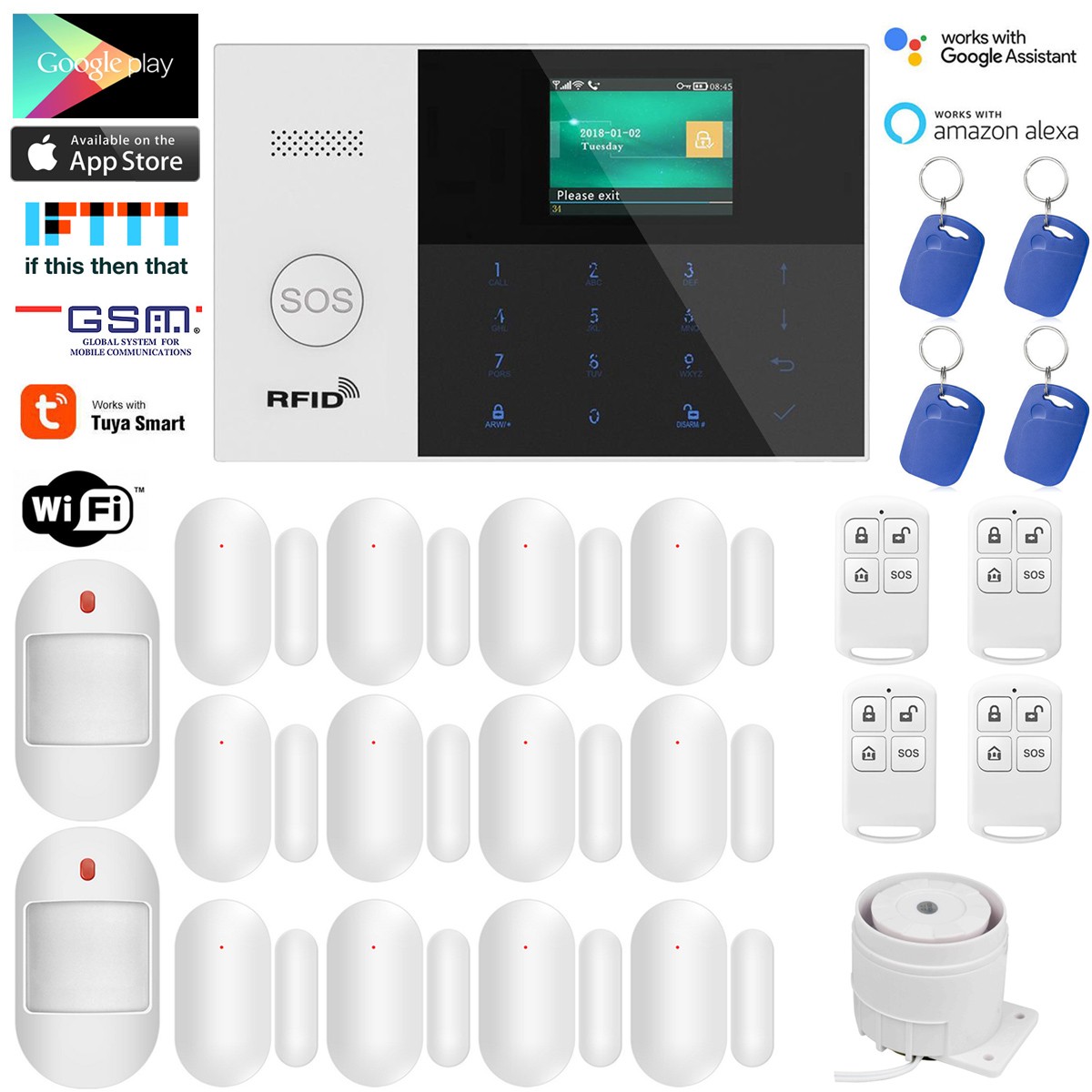

Photos from current listings. Actual item, color, and included accessories may vary.
House Alarm Buying Guide
A house alarm is a whole-home intrusion detection system that pairs a central hub with door/window contacts, motion sensors, and often a siren or cellular backup. The core trade-off is between low-cost local-only kits with proprietary RF and expandable hybrid panels that support standard sensor protocols and dual-path communication. Choose a hub that supports at least two communication paths and standard sensor frequencies for durability; skip single-channel Wi-Fi-only kits with sealed sensor ecosystems.
At a glance
- Category
- Home Security
- Last updated
- Nov 22, 2026
Current offers
Highlights
- Hub communication tiers: Wi-Fi-only is cheapest but fails when the router or internet drops; GSM/cellular or dual-path Wi-Fi + GSM maintains alarm reporting and app control during outages.
- Sensor RF standards: 433 MHz and 868 MHz are the common hybrid-panel frequencies, while 2.4 GHz Wi-Fi sensors trade battery life and range for direct router pairing without a hub.
- Expandability ceiling: hybrid panels typically support 30-100+ zones and multiple keypads, while app-only Wi-Fi kits often cap at 10-20 accessories on one account.
- Power resilience: a house alarm needs a backup battery in the hub and siren; 12V sealed lead-acid or 18650 lithium cells provide 8-24 hours of standby, while USB-only hubs go dark in an outage.
Best use cases
- Best fit for renters and small apartments: a Wi-Fi hub with peel-and-stick contacts and a plug-in siren, no drilling and no monitoring contract.
- Best fit for houses with outbuildings or long runs: a hybrid 433/868 MHz panel with wired zone inputs and a GSM module for dual-path reporting.
- Wrong fit for anyone expecting police dispatch: a self-installed app kit only notifies your phone; professional monitoring requires a compatible central-station plan or a monitored panel.
- Skip Wi-Fi-only kits for rural or unreliable-internet homes; choose a GSM/cellular-backed panel so alarm signals still transmit when broadband is down.
Buying tips
- Count every door, window, and motion zone first; buy a hub rated for at least 20% more zones than you need so sensors can be added without replacing the panel.
- Match sensor frequency to your hub: 433 MHz sensors pair with most hybrid panels, 868 MHz offers less interference in dense areas, and 2.4 GHz Wi-Fi sensors only work with the same brand's app.
- Check the power spec: look for a hub with a rechargeable backup battery and a 12V DC input, and a siren rated 100-120 dB at 1 meter for audible deterrence.
- For cellular backup, confirm the panel's GSM module supports the carrier bands in your region and uses a replaceable SIM rather than a soldered eSIM.
Specs
| Hub Comms | Wi-Fi / GSM / Dual-path |
|---|---|
| Sensor RF | 433 MHz / 868 MHz / 2.4 GHz Wi-Fi |
| Zone Capacity | 10-20 app kits / 30-100+ hybrid |
| Backup Battery | 8-24 hr standby, replaceable cell |
Related searches
What to check before buying
- Measure door and window frame widths and gaps; contacts need 10-20 mm of magnet gap and 25-50 mm of mounting space per side.
- Verify Wi-Fi coverage at the intended hub location and confirm the router's 2.4 GHz band is enabled, since most alarm hubs do not support 5 GHz.
- Confirm the plug type and voltage for the hub's power adapter matches your country's standard and that the backup battery is user-replaceable.
- Decide whether you need a keypad, remote fob, or pet-immune PIR sensors, and check the hub bundle includes the matching companion parts.
FAQ
Data sources: eBay / Amazon listings and product attribute feeds. Updated Nov 22, 2026.
Some links on this page are affiliate links. If you buy after clicking one, we may earn a commission at no extra cost to you. This does not change which products appear here or their order. Affiliate disclosure.